A hyper-realistic portrait
A sourced portrait banana prompt for A hyper-realistic portrait with realistic, portrait, photography direction. It includes the original copy-ready prompt text, the reference image, and enough structure to reuse the visual idea safely.
Prompt strategy
How this banana prompt works
This banana prompt is built around a clear intent: Create A hyper-realistic portrait as a reusable portrait visual prompt. It starts with the result, then adds structure, style, and failure-prevention constraints so Nano Banana Pro has less room to invent unusable details. Use the variables as controlled inputs: they make the banana prompt reusable while keeping the creative direction stable.
Copy-ready template
Full banana prompt
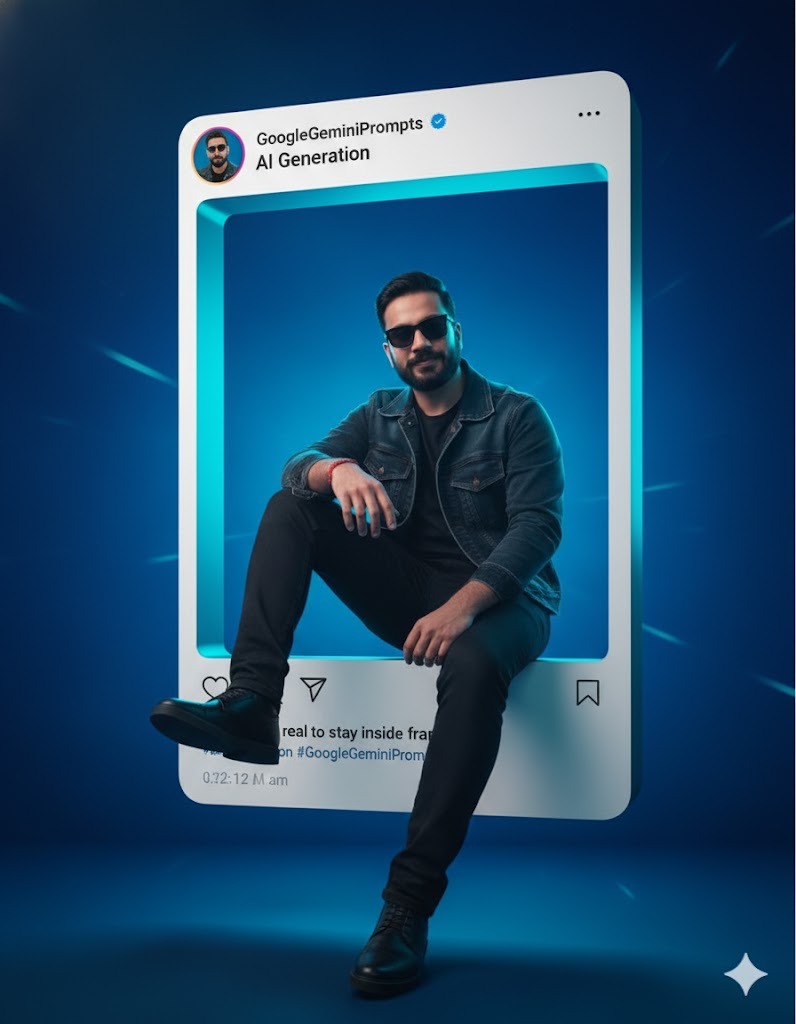
A hyper-realistic portrait of the uploaded young man inside a giant Instagram post frame that dominates the scene. His face remains same, sharp and untouched, wearing dark sunglasses and sleek shoes, exuding bold charisma. His relaxed pose shows his right elbow resting on his knee, left arm casual, and one leg stepping out of the Instagram frame in a 3D illusion. The Instagram frame is highly realistic with username GoogleGeminiPrompts, verified checkmark, display name "Al Generation", caption: "Too real to stay inside frame #AlCreation #GoogleGeminiPrompts", and authentic icons. The background is designed for masculine boldness: deep cobalt blue blending into cyan, with subtle light streaks adding energy, Clean, cinematic lighting highlights his clothing textures and the 3D illusion, making him the viral centerpiece.
Variable slots
Customize the prompt without breaking it
subject
The person, object, scene, or reference photo being transformed.
Example: the uploaded portrait, product, outfit, room, or hero subject
style direction
The lighting, lens, mood, palette, and medium constraints.
Example: Realistic, Portrait, Photography
quality guardrails
Details that should stay accurate and failure cases to avoid.
Example: preserve identity, keep text readable, avoid distorted hands or faces
Prompt structure
- 1Start from the portrait outcome and the exact subject to preserve.
- 2Layer in composition, lighting, material, mood, and camera language.
- 3Keep the prompt constraints close to the visual details that matter most.
- 4Review the generated image against the uploaded reference before publishing.
Usage tips
Use the prompt as a production brief and replace personal references before reuse.
Source tags: Realistic, Portrait, Photography, Modern, Fantasy, Vibrant / Colorful, Flat Design.
Original model/tool note: Gemini.
Prompt variations
Reuse this banana prompt in adjacent styles
Adapt A hyper-realistic portrait into a vertical social post by tightening the crop.
Swap the color grade while keeping the same subject and camera direction.
Turn the scene into a cleaner commercial version by reducing background detail.
Banana prompt FAQ
Questions before copying this prompt
Can I reuse the A hyper-realistic portrait banana prompt?
Yes. Replace personal references and keep the core subject, lighting, and guardrails intact so the output remains controlled.
Where did this source prompt come from?
It was imported with authorization from https://www.bananaprompts.xyz/prompts/14a68538-655b-4320-93e7-12fe81e6bba7 and mirrored with its image in this site's R2 storage.